Shopify Speed Optimisation: The Practical Guide We Hand to New Clients
Most slow Shopify stores are not slow because of Shopify. They are slow because of five years of apps, oversized images and tracking scripts nobody remembers adding. This is the clean-up plan we give every new client.

Key takeaways
- Shopify speed optimisation is mostly subtraction: fewer apps, fewer scripts, lighter images and less theme code doing work on every page.
- Start with real visitor data from the Shopify web performance report and PageSpeed Insights field data, not a single lab score on your homepage.
- Uninstalling an app rarely finishes the job. Leftover snippets and app embeds keep loading until someone removes them from the theme.
- Images, fonts and video on the first screen decide how fast a page feels. Size them for the slot they fill and stop loading what nobody sees.
- Run a short speed audit every month and before every big sale, because every new app, pixel or banner quietly adds weight.
01Why Shopify speed optimisation starts with subtraction
When a new client asks us for Shopify speed optimisation, they usually expect a technical trick: a plugin, a setting, a magic line of code. The honest answer is less exciting. Shopify’s hosting, CDN and checkout are fast out of the box. What slows a store down is everything that gets layered on top of the platform over time, and most of the work is taking things away rather than adding them.
A typical store we inherit has been running for three or four years. It has had two theme changes, three agencies, a dozen app trials, a review widget that was replaced by another review widget, and a stack of tracking pixels from campaigns that ended long ago. Each decision made sense at the time. Together they turn a quick theme into a page that makes shoppers wait.
This guide is the version we hand to founders and marketing leads on day one of our Shopify speed optimisation service. It covers the fixes that move real visitor numbers, the order we do them in, and the routine that stops the weight creeping back. The definitions of Core Web Vitals get only a short mention here; we keep the metric deep dive for a separate piece.
What we mean by a fast store
We judge speed by what real shoppers experience on their own phones, not by a perfect score on a developer laptop. Google’s Core Web Vitals give us the yardstick: Largest Contentful Paint good at 2.5 seconds or less, Interaction to Next Paint good at 200 milliseconds or less, and Cumulative Layout Shift good at 0.1 or less, measured at the 75th percentile of real visits. If your product pages hit those on mobile, you are in good shape. If they do not, the sections below explain where the time usually goes.
02How slow pages cost you sales
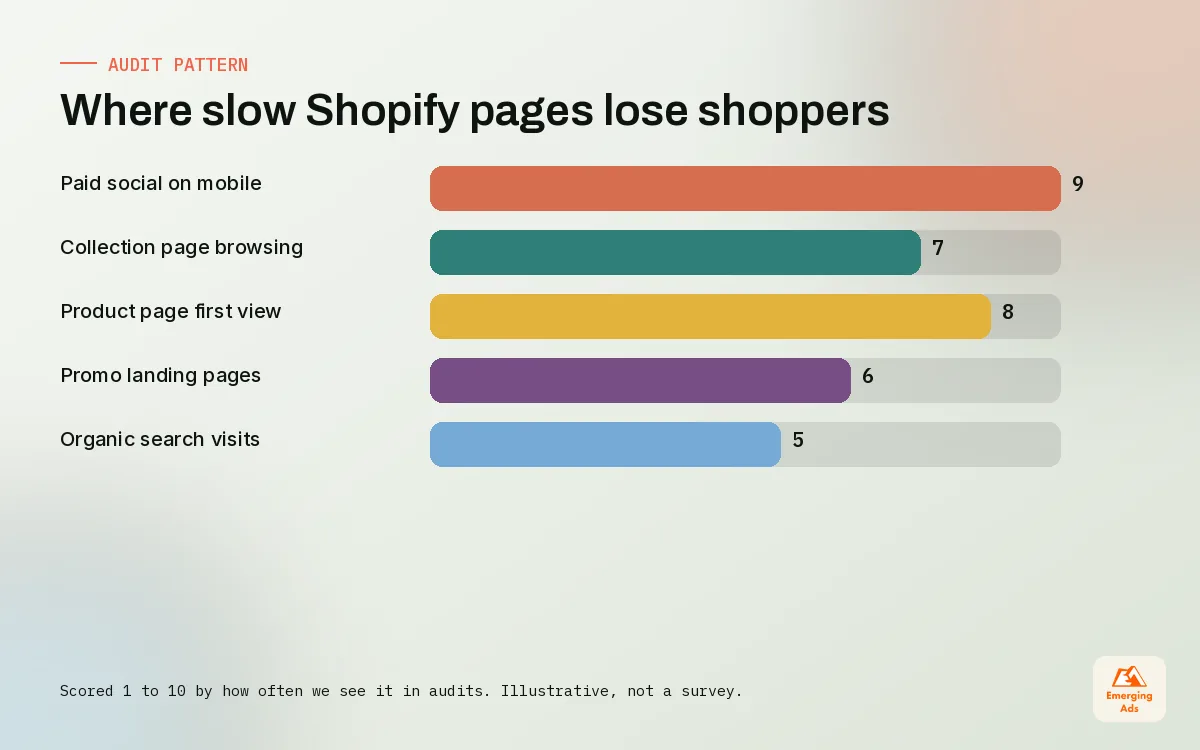
Speed is a conversion problem dressed up as a technical one. A shopper who taps an ad on a train has a few seconds of patience. If the hero image is still loading and the add-to-cart button jumps when a banner appears, they go back to the feed. You paid for that click and got nothing for it.
On accounts we manage, slow stores show the same pattern in analytics: a decent add-to-cart rate on desktop, a much weaker one on mobile, and a bounce rate on paid social traffic that looks out of line with the quality of the ads. When we fix speed, the mobile gap usually narrows. We do not promise a number, because speed is one factor among many, but we have never seen a store get worse at converting because it got faster.
- Paid traffic suffers first. Visitors from Meta and TikTok arrive cold, on mobile, often on patchy connections. They are the least forgiving audience you have.
- Collection pages get skipped. Heavy grids with dozens of full-size images make browsing feel sticky, so shoppers stop after the first scroll.
- Search visibility takes a hit. Page experience is part of how Google evaluates pages, and a slow template affects every product that uses it. That is why speed sits inside every ecommerce SEO plan we write.
- Testing gets noisy. If the page is slow, your A/B tests measure patience as much as persuasion. Our Shopify conversion optimisation work always starts with a speed check for this reason.
If you want the wider picture of how speed fits with everything else a store needs week to week, our Shopify store management guide covers the full routine, and the Shopify conversion rate optimisation guide explains how we test once the pages are quick.
03Where the load time actually goes on a Shopify store
Before fixing anything, we build a simple inventory of what loads on the three templates that matter most: the homepage, a collection page and a best-selling product page. We open each one in Chrome DevTools, sort the network requests by size and by domain, and write down every third party we find. It is tedious work, and it is the most useful hour of the whole project.
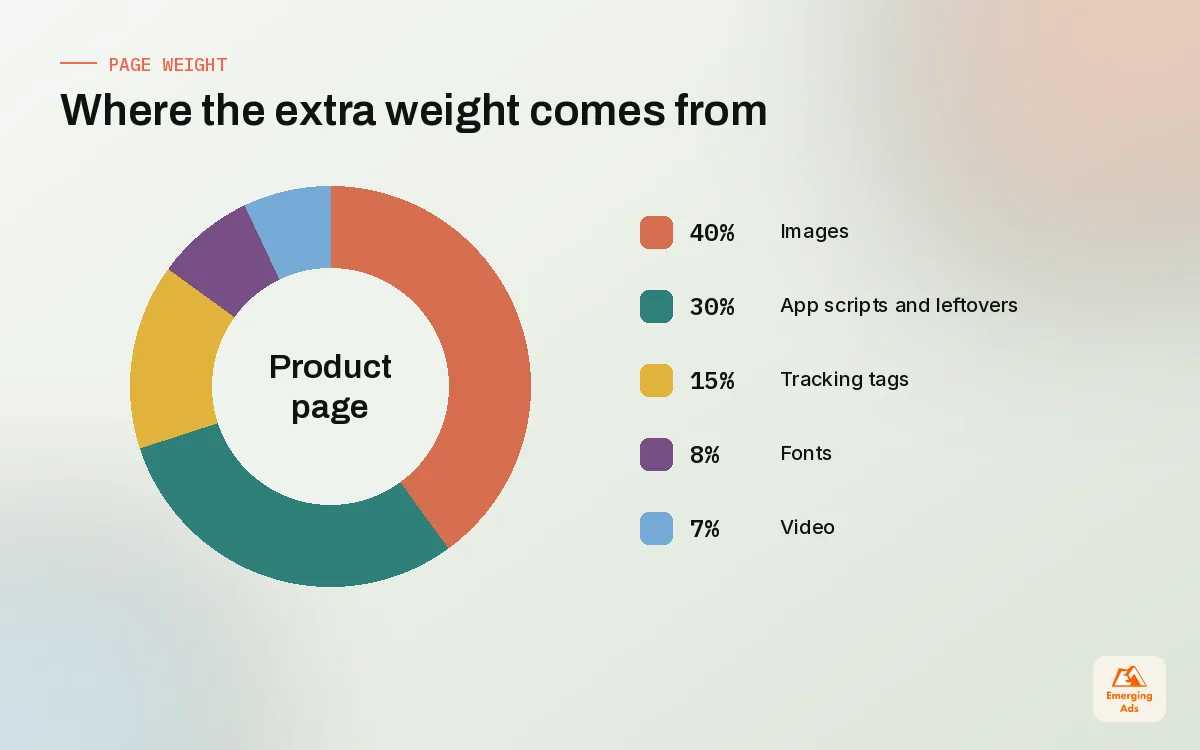
| Source of weight | What we usually find | Typical fix |
|---|---|---|
| Images | Hero and product images uploaded at camera size, served larger than the slot | Resize at upload, request the right size in the theme, lazy load below the fold |
| Apps | Six to fifteen apps, several injecting scripts on every page | Remove unused apps, limit others to the pages that need them |
| Leftover code | Snippets from apps uninstalled months or years ago | Search the theme files and remove dead includes |
| Tracking | Duplicate pixels, old tags, two analytics setups | Consolidate through customer events and one clean tag setup |
| Fonts | Three or four custom families with many weights | One or two families, fewer weights, system fallbacks |
| Video | Autoplay hero video loading on mobile | Poster image first, load video only when needed |
The pattern across fashion, beauty, supplements and home stores is remarkably consistent. Images and apps account for most of the problem; fonts and video finish it off. The order of fixes in the rest of this guide follows that pattern.
04Shopify speed optimisation step 1: theme choice and theme code
The theme is the foundation. Online Store 2.0 themes, with sections and app blocks on every template, are far easier to keep fast than older themes that relied on hard-coded app snippets. Dawn, Shopify’s free reference theme, is a sensible benchmark: if your current theme is dramatically slower than Dawn on the same products, the theme itself is part of the problem.
When to keep the theme and when to move
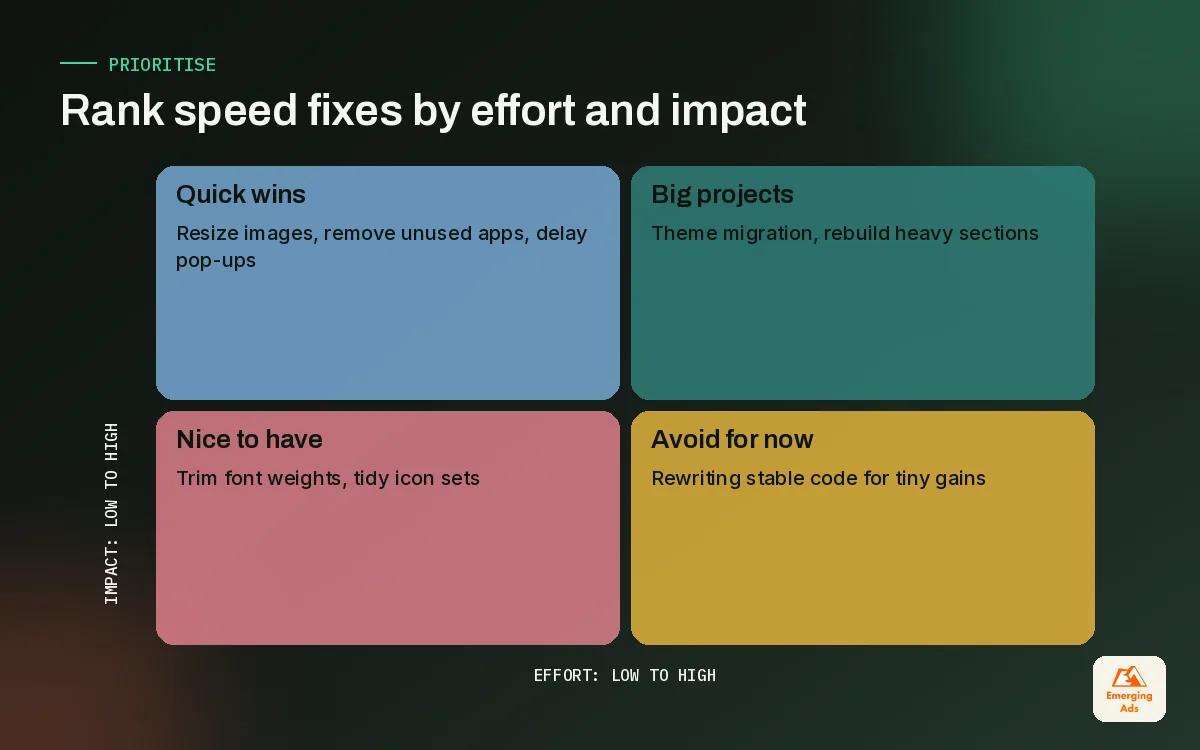
We rarely recommend a theme change purely for speed. A migration is a real project, with design, QA and app reinstallation. We suggest moving when the store is still on a pre-2.0 theme, when the theme has been heavily customised by several developers with no documentation, or when the store is planning a redesign anyway. If the brand needs a new look at the same time, our landing page design team usually builds the key templates alongside the migration so the work happens once.
Cleaning a theme you keep
- Remove sections that are installed but not used on any page. They often still ship CSS and JavaScript.
- Check for duplicate libraries, such as two carousel scripts or two copies of the same icon set.
- Turn off theme features you do not use, like quick view, predictive search styling or animated reveals, if they add script weight.
- Keep custom code in clearly named snippets with a comment saying who added it and why. Future you will be grateful.
The fastest code on a Shopify store is the code you never load.
05Step 2: images that look sharp and load fast
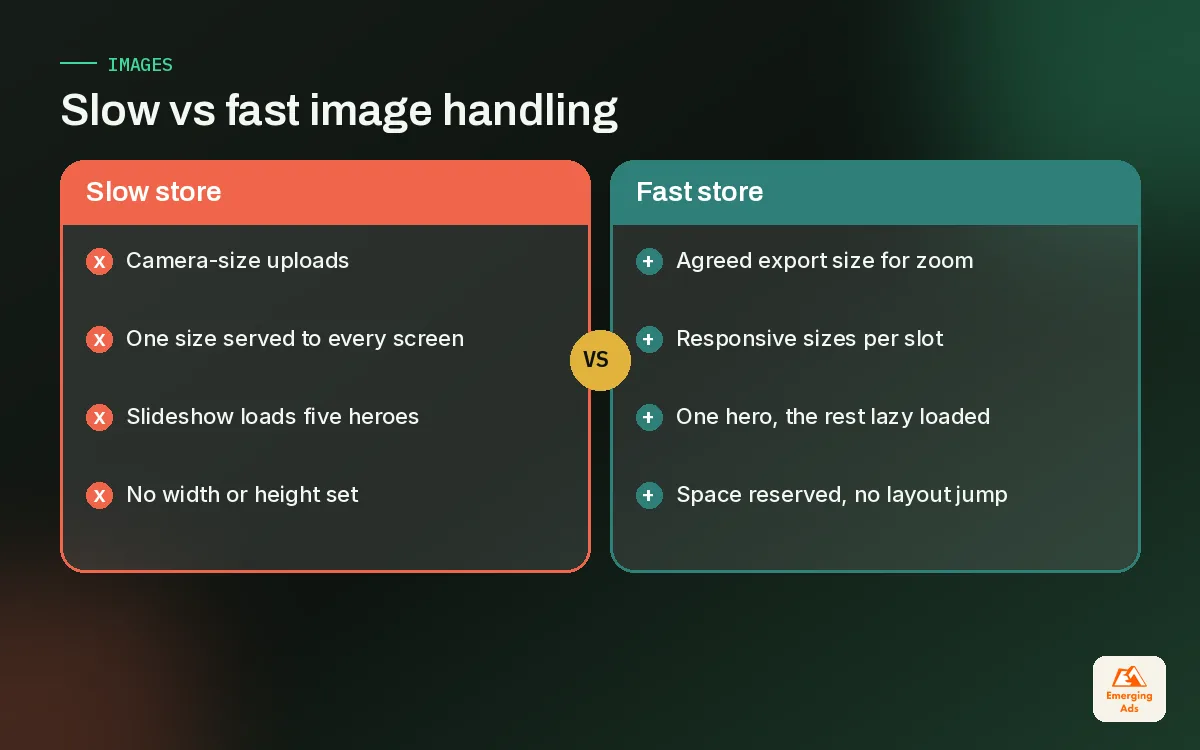
Images are the most common reason a product page feels slow, and the easiest to fix. Shopify’s image CDN can serve resized versions of each file, so the job is to make sure the theme asks for a size that matches the slot instead of the original upload. A 4,000 pixel product shot squeezed into a 600 pixel column is wasted data on every visit.
- Upload sensibly. Export product photos at a sensible maximum width for zoom, not straight from the camera. Agree a standard with whoever shoots your products.
- Use responsive sizes. The theme should provide several widths so phones download small files and large screens get sharper ones.
- Prioritise the first image. The hero image or first product image should load straight away. Do not lazy load it.
- Lazy load everything below the fold. Collection grids, review photos, recommendation carousels and footer logos can wait until the shopper scrolls.
- Reserve space. Set width and height so the layout does not jump when images arrive.
A beauty client we took on recently had a homepage slideshow with five full-width images, all loading immediately on mobile. Replacing it with one static hero and moving the other four into a scrolling section below the fold did more for perceived speed than any code change we made that month.
06Step 3: app bloat, leftover code and third-party scripts
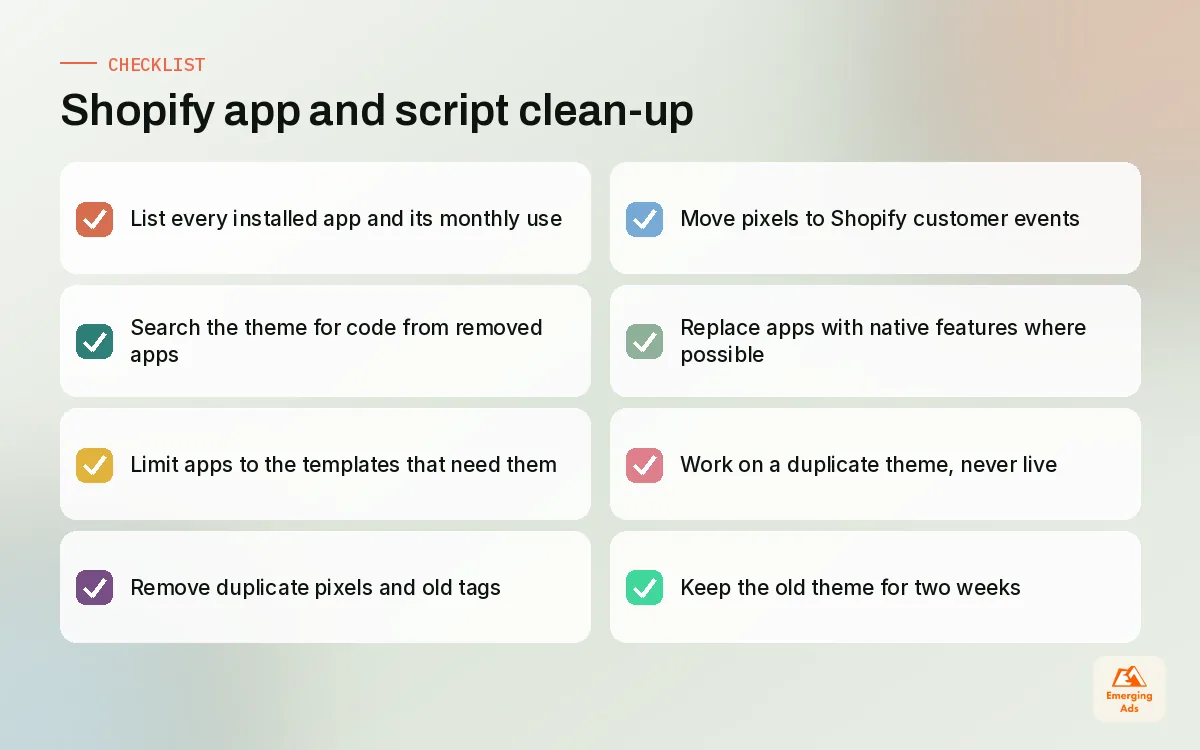
Every app that injects scripts can slow a store, and uninstalling an app does not always remove its leftover theme code. This is the single most valuable fact for anyone working on Shopify speed. We regularly find snippets from review apps, pop-up tools and currency converters that were removed years ago and still load on every page, sometimes throwing errors in the console.
Our app and script audit
| Question | If yes | If no |
|---|---|---|
| Is the app still installed and paid for? | Check whether it is still used | Search the theme for its leftover code and remove it |
| Does it need to run on every page? | Keep it, but check its weight | Restrict it to the templates that need it |
| Can a native feature or theme section replace it? | Plan the swap and remove the app | Keep it and monitor |
| Does it load its own fonts, jQuery or libraries? | Ask the vendor about a lighter mode or replace it | Fine |
| Has anyone looked at its data in 90 days? | Keep it | Strong candidate for removal |
Tracking deserves its own pass. Stores often run the same pixel twice, once from an app and once from code pasted into the theme years ago. Shopify’s customer events (Web Pixels) are the supported way to add tracking pixels now, and moving tags there tidies both performance and data quality. We usually pair this with a clean GA4 setup through the Google and YouTube app and a check of the Meta pixel tracking setup, so numbers stay trustworthy after the clean-up.
07Step 4: fonts, video and everything else on the first screen
Once images and apps are under control, the remaining weight usually sits in fonts and video. Both are brand decisions as much as technical ones, so we involve the founder or creative lead before changing them.
Fonts
Each font family and each weight is another file. A store using one family for headings and one for body text, with two weights each, is plenty. Where possible, use the fonts available in the theme settings and make sure text appears in a fallback font while the custom one loads, so shoppers can read straight away.
Video
Video sells products, especially in beauty, fashion and electronics. It also weighs far more than images. Our approach is to show a lightweight poster image first and load the video only when the shopper taps play or scrolls to it. Short, well-compressed clips made for the web beat repurposed brand films every time, which is why our video content production team cuts separate versions for product pages and ads.
Pop-ups, banners and chat widgets
Email pop-ups, announcement bars, chat bubbles and countdown timers all compete for the first few seconds. Delay pop-ups until the shopper has engaged, load chat only after interaction or on support pages, and make sure banners reserve their space so the page does not shift.
08The Shopify speed audit routine we run every month
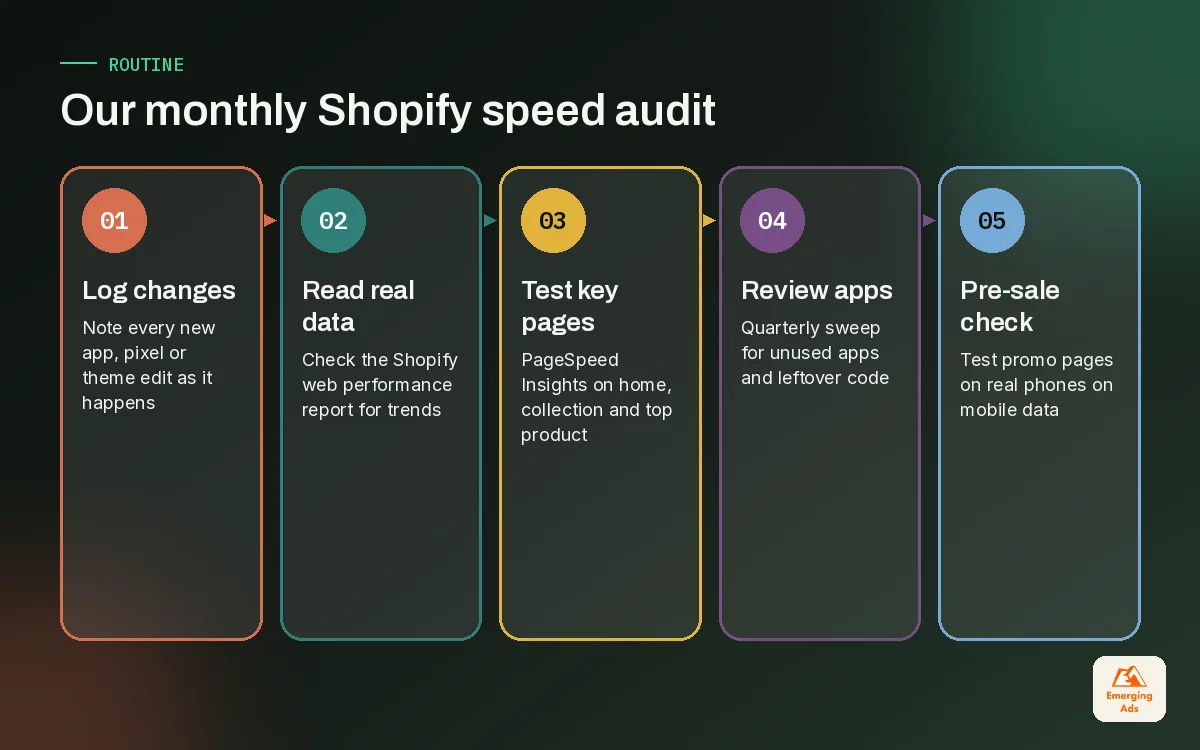
Speed decays. A store that is quick after a clean-up will be slower in six months unless someone watches it. We run a light audit monthly and a full one before every major sale period.
| Frequency | What we check | Tool |
|---|---|---|
| Weekly | Any new app, pixel or theme change logged with a note | Change log |
| Monthly | Real visitor trends on key templates | Shopify web performance report |
| Monthly | Field and lab data for homepage, collection and top product | PageSpeed Insights |
| Quarterly | Full app and leftover code review | Theme code search and DevTools |
| Before big sales | Mobile test of every promo landing page and banner | Real phones on mobile data |
The Shopify admin web performance report is based on real visitor data, so it shows trends after a change rather than a one-off test. PageSpeed Insights adds field data from the Chrome UX Report and lab data from Lighthouse, which helps explain why a page is slow. We use the two together and never panic over a single lab score.
To understand how speed changes affect behaviour, we pair the numbers with session recordings and scroll maps through our heatmap analysis setup. Seeing shoppers rage-tap a button that has not finished loading is more persuasive in a team meeting than any chart.
09Doing it yourself vs bringing in help
A confident store owner can do a surprising amount alone: remove unused apps, compress and resize images, cut down fonts and delay pop-ups. Those steps alone fix many stores. The harder work is removing leftover code safely, restructuring theme sections and consolidating tracking without breaking attribution, and that is where mistakes get expensive.
If you want a second pair of eyes, our Shopify team does this work every week across fashion, beauty, supplements, home, jewellery, pet, food and electronics stores. You can see the wider set of EmergingAds services that connect to speed, from tracking to paid media, or read more about how we work on the teamemergingads.com homepage.
Whatever you decide, start with the inventory. Write down everything that loads, ask who still uses it, and remove what nobody can defend. Most Shopify stores get noticeably faster in a week that way, before anyone writes a line of new code.
Frequently asked questions
Straight answers to what clients ask us most about shopify speed optimisation.
What is Shopify speed optimisation?
Why is my Shopify store so slow?
Does uninstalling a Shopify app remove its code?
Will a speed app make my Shopify store faster?
How do I check my Shopify store speed?
Does store speed affect conversion rate?
Should I change my Shopify theme to improve speed?
How should I size product images on Shopify?
Do tracking pixels slow down a Shopify store?
How often should a Shopify store be checked for speed?
Can I do Shopify speed optimisation myself?
Is your Shopify store slower than it should be?
We will run our speed audit on your store, list every script, app and image that is costing you load time, and rank the fixes by effort and impact.
Book your free audit