Shopify Core Web Vitals in 2026: A Field Guide From Live Stores
Shopify Core Web Vitals are three numbers that describe how your store feels to real shoppers on real phones. This is how we read them, why they fail on Shopify, and what we change for each one.
Key takeaways
- Shopify Core Web Vitals are LCP (loading), INP (responsiveness) and CLS (visual stability), judged at the 75th percentile of real visits.
- Field data from real shoppers decides whether you pass. Lab scores from Lighthouse are a diagnostic tool, not the verdict.
- Each metric fails for different reasons on Shopify, so diagnose per metric and per template before changing anything.
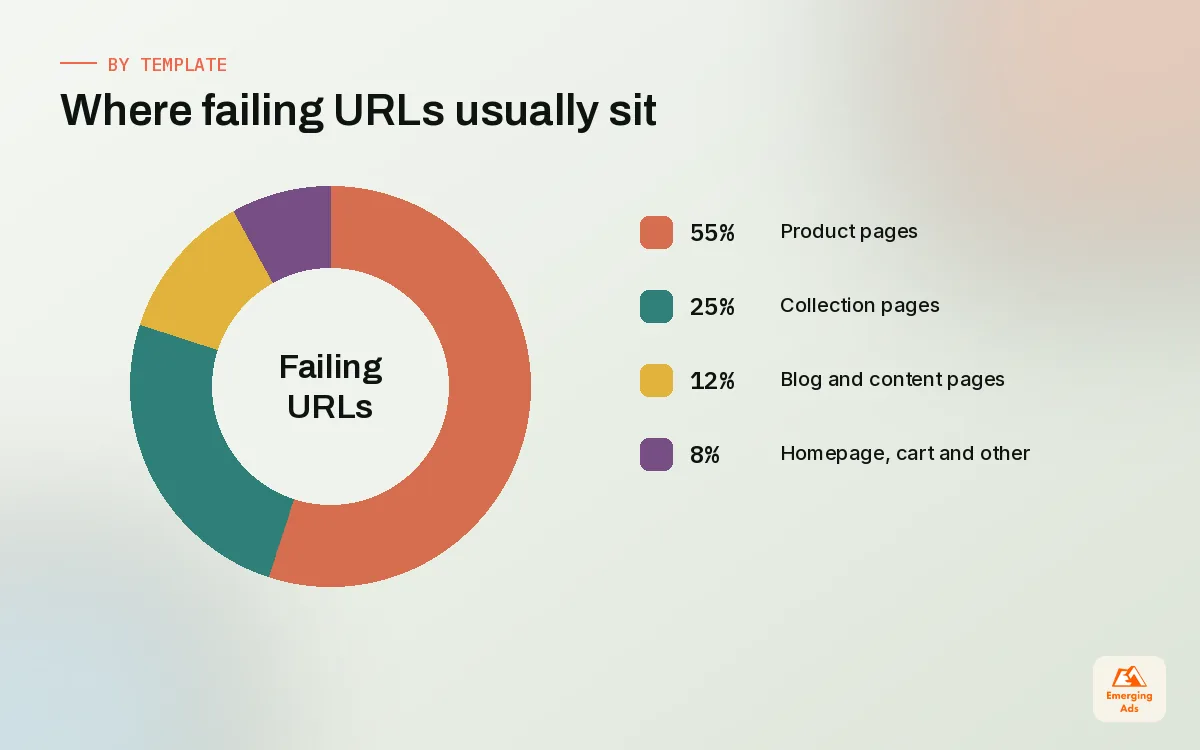
- Product and collection templates carry most of the revenue and most of the failing URLs, so start there rather than on the homepage.
- Field data moves slowly. Log every release, wait for the rolling data to catch up, and judge the trend rather than one day’s reading.
01What Shopify Core Web Vitals actually measure
Most founders first hear about Shopify Core Web Vitals from a red warning in PageSpeed Insights or an email from Search Console saying some URLs are poor. The natural reaction is to chase the score. We understand the impulse, but it usually leads to the wrong work. The vitals are not a grade for your developer. They are three measurements of what shoppers experience: how quickly the main content appears, how quickly the page reacts when they tap, and whether things jump around while they are trying to read or buy.
Our speed team handles a lot of performance work, and our companion piece, the practical Shopify speed optimisation guide, covers the clean-up itself: themes, images, apps and scripts. This guide sits one level up. It explains the metrics, how to read the reports, and how to tell which fix belongs to which failing number, so the clean-up is aimed rather than random.
| Metric | What it measures | Good | Needs improvement | Poor |
|---|---|---|---|---|
| Largest Contentful Paint (LCP) | Time until the largest image or text block in view has rendered | 2.5 s or less | Over 2.5 s up to 4 s | Over 4 s |
| Interaction to Next Paint (INP) | Delay between a tap, click or key press and the next visual update | 200 ms or less | Over 200 ms up to 500 ms | Over 500 ms |
| Cumulative Layout Shift (CLS) | How much visible content moves unexpectedly while the page is open | 0.1 or less | Over 0.1 up to 0.25 | Over 0.25 |
Two details in that table matter more than people expect. First, the thresholds are judged at the 75th percentile of real visits, so three quarters of your shoppers need a good experience before the metric counts as good. A fast experience on your office wifi tells you nothing about the shopper on a mid-range phone on a train. Second, INP replaced First Input Delay in March 2024. FID only measured the first interaction and many stores passed it easily. INP looks at interactions across the whole visit, which is why plenty of Shopify stores that were green two years ago now show amber or red.
02Field data vs lab data: why your scores disagree
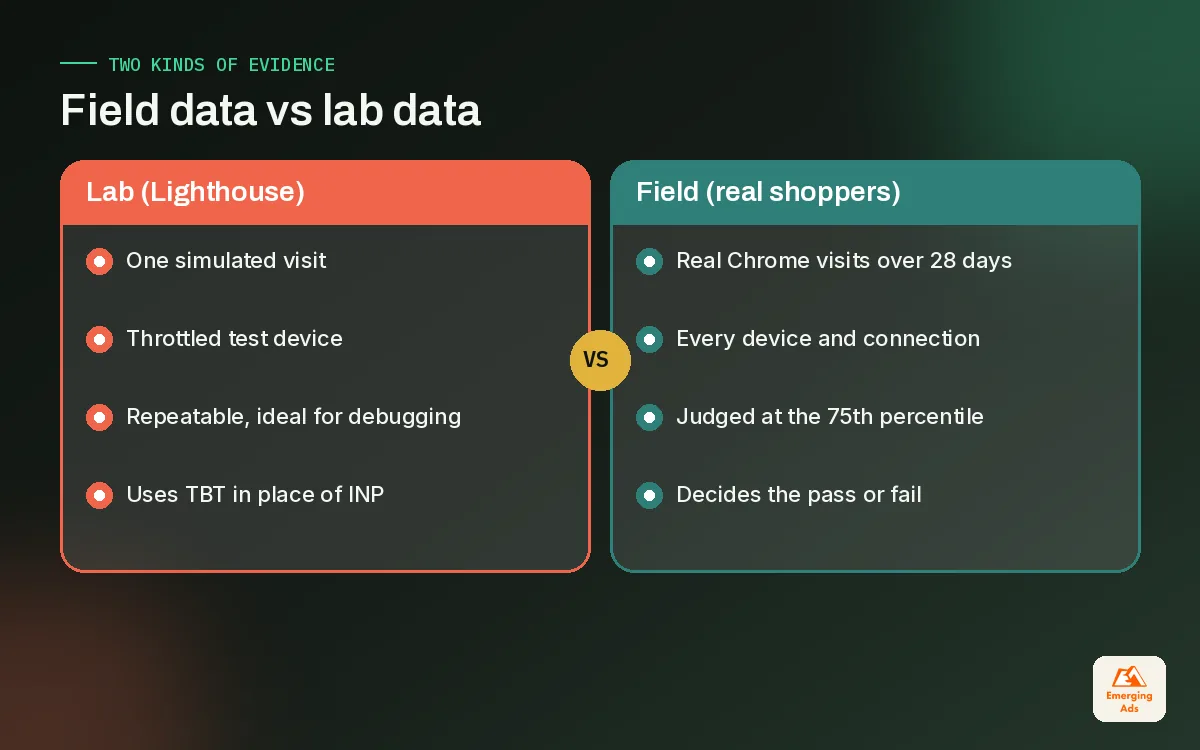
The single most common confusion we sort out on new accounts is the gap between a Lighthouse score and the Core Web Vitals assessment. A client sends us a screenshot of a performance score of 38 and asks why Search Console says the product pages are fine. Or the opposite: a lovely lab score and a failing field assessment. Both are normal, because they measure different things.
Field data: what real shoppers experienced
Field data comes from real Chrome users who visited your store, collected in the Chrome UX Report. PageSpeed Insights shows it at the top of the report when your URL or origin has enough traffic. It reflects every device, connection and browsing pattern your audience actually has. Because it is aggregated over a rolling 28-day window, it changes slowly. This is the data that decides whether your pages pass.
Lab data: a controlled test run
Lab data comes from Lighthouse running one simulated visit on a throttled device and connection. It is repeatable, which makes it excellent for debugging and for comparing two versions of a template. It cannot measure INP properly, because nobody taps anything in a lab run, so it reports Total Blocking Time as a proxy. And it never sees the cookie banner that appears for some visitors, the app that only loads for logged-in customers, or the shopper who scrolls fast and taps the size selector before scripts finish.
Shopify’s admin also has a web performance report built on real visitor data, which we like because it sits next to your sales numbers and shows changes over time. Use it alongside the Chrome data rather than instead of it.
03How to read PageSpeed Insights and Search Console for a Shopify store
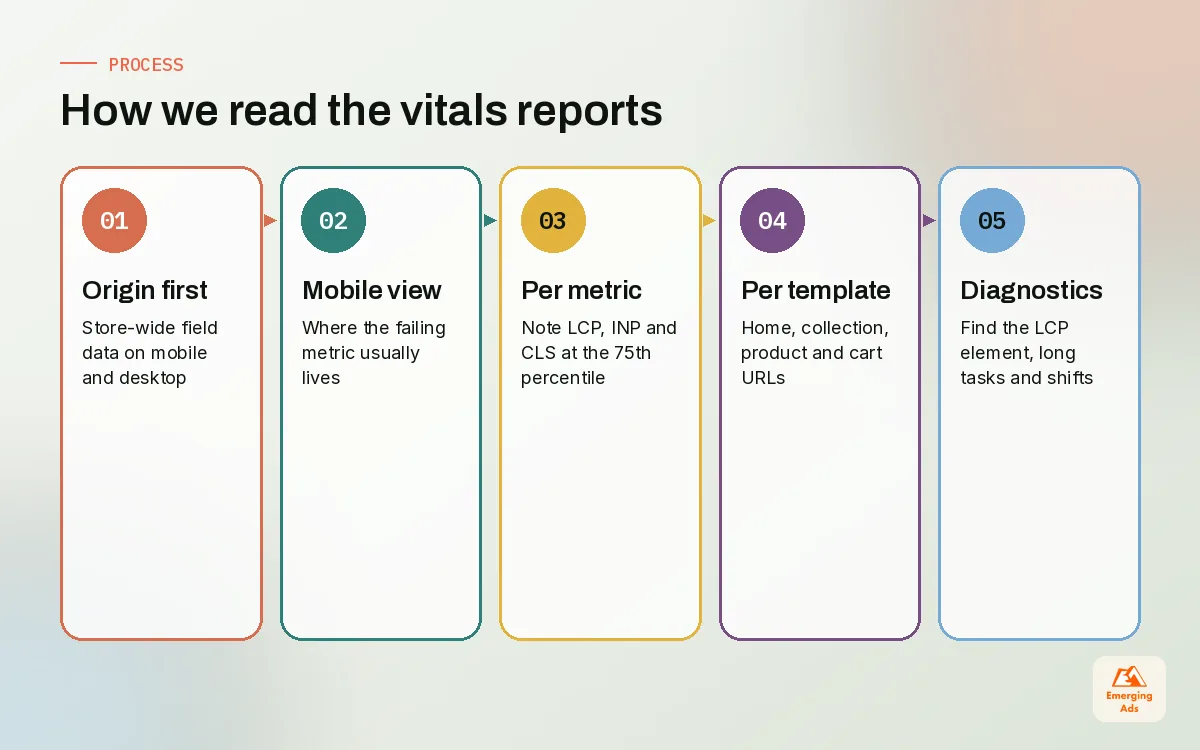
Reading the reports well saves weeks of wasted effort. This is the order we follow when we open a new store, and it takes about half an hour.
- Start with the origin, not one URL. In PageSpeed Insights, switch between the URL view and the origin view. The origin summary tells you how the whole store performs for real shoppers on mobile and desktop.
- Check mobile first. Most Shopify traffic we see is mobile, and mobile is almost always where the failing metric lives.
- Note which metric fails, not the overall verdict. Write down LCP, INP and CLS separately with their 75th percentile values.
- Run single URLs per template. Test one product page, one collection page, the homepage and the cart page. Many product URLs lack enough traffic for URL-level field data, so the report falls back to the origin.
- Use the lab diagnostics only after that. Expand the diagnostics to find the LCP element, the long main-thread tasks and the elements that shifted.
The Search Console Core Web Vitals report
Search Console groups URLs that look alike into groups and labels them good, needs improvement or poor for each device type. On a Shopify store this grouping is useful, because it tends to line up with your templates: hundreds of product URLs fail together because they share one template. When you see a group of product URLs flagged for CLS, the fix is one change to the product template, not hundreds of page edits. After you ship a fix, the validation process lets you track whether the group recovers over the following weeks.
What not to read too much into
The overall performance score on the lab tab moves around between runs and between tools. We have seen the same product page score 20 points apart on two consecutive runs. Treat it as a hint about where the weight is, not as a KPI to report to the board.
04Shopify LCP: why the main image arrives late
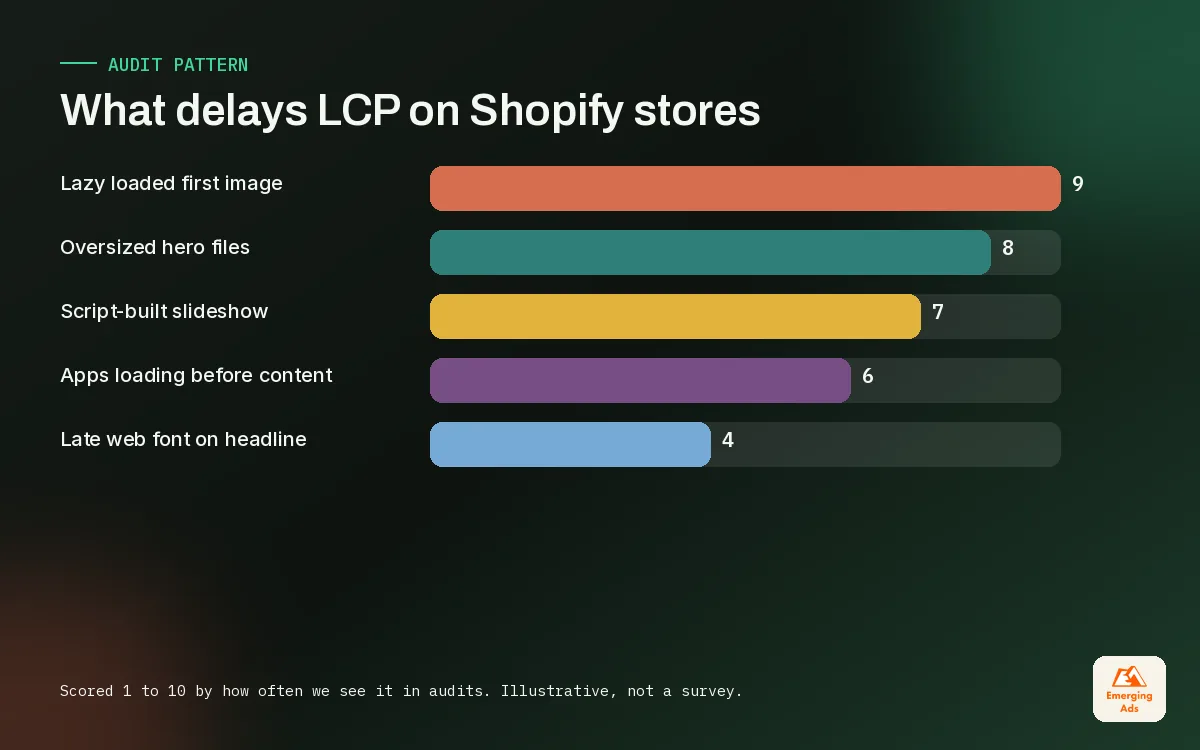
Largest Contentful Paint is the metric that fails most often on the Shopify stores we take over, and the cause is nearly always the hero image on the homepage or the first product image on the product page. LCP is a chain: the server responds, the browser finds the image, downloads it, and paints it. A delay at any step pushes LCP back.
| What we find | Why it hurts LCP | What we change |
|---|---|---|
| Hero or first product image is lazy loaded | The browser waits until layout is known before even requesting it | Load the first-screen image eagerly and give it high fetch priority |
| Image served far larger than its slot | Mobile phones download desktop-sized files | Use responsive image sizes so the phone gets a phone-sized file |
| Slideshow that builds the first slide with JavaScript | Nothing paints until the script runs | Render the first slide in the HTML, enhance later or drop the slider |
| Several apps loading before the main content | Scripts compete with the image for bandwidth and the main thread | Defer non-essential app scripts until after first paint |
| Custom web fonts on a large headline that is the LCP element | Text waits for the font file | Preload one font weight and allow a fallback to show first |
A pattern we see on fashion and beauty stores: a beautiful homepage video or slideshow at the top, with the actual product imagery three swipes away. The LCP element becomes a large poster frame that loads late, and the first impression on mobile is a grey box. Swapping that for a single, properly sized still image with the video lower down often moves LCP from poor to good without touching anything else.
Product pages fail LCP for a different reason. The gallery app or theme gallery loads the main image only after its own script initialises. If your store relies on conversion work on product pages, keep the first image in plain HTML so speed and persuasion stop fighting each other.
05Shopify INP: when taps feel sticky
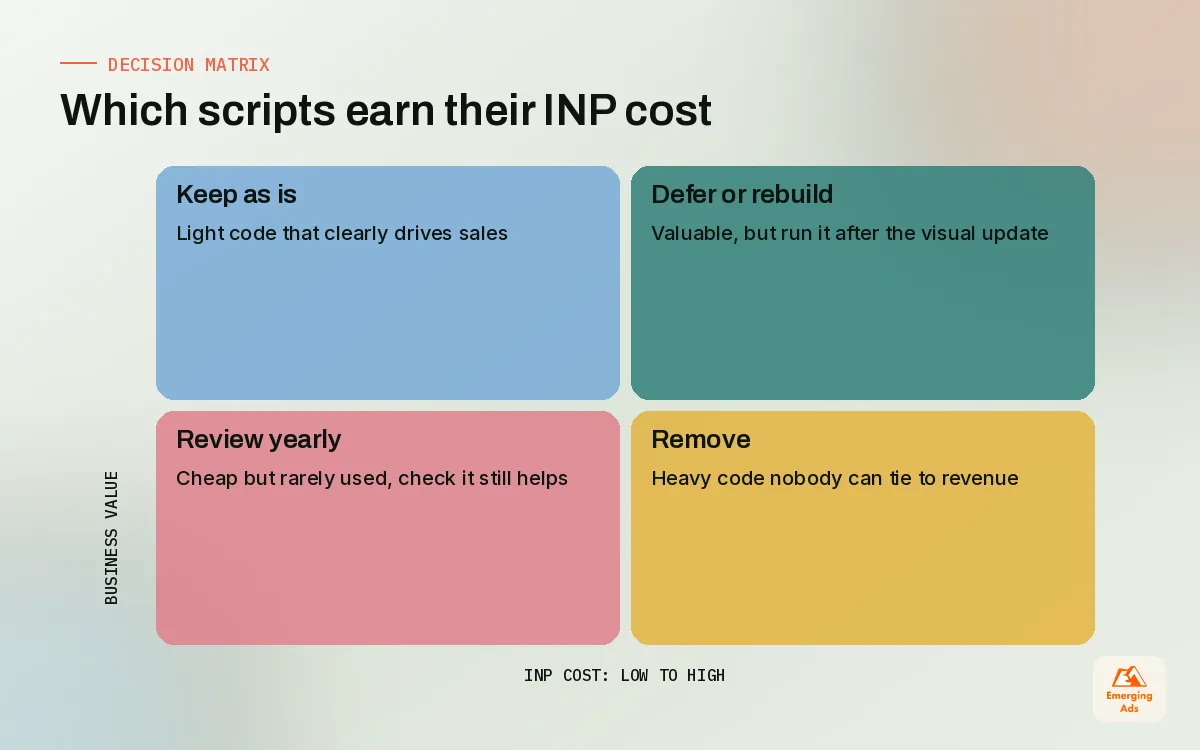
Interaction to Next Paint is the metric shoppers feel but rarely describe. They say the site feels heavy, the size button does not respond, or the cart drawer is slow. What is happening underneath is that the browser’s main thread is busy running JavaScript when the shopper taps, so the visual response waits in a queue.
The usual suspects on Shopify
- Variant selectors that rebuild the page. Choosing a size or colour triggers a script that re-renders price, images, stock messages and sometimes the whole product form.
- Cart drawers and upsell apps. Add to cart fires several apps at once: the drawer, a free shipping bar, an upsell widget and the tracking events.
- Tracking that runs on every click. Several pixels and tag managers listening to every interaction, each doing a little work that adds up.
- Mega menus and filters. Large navigation menus and collection filters that recalculate on each tap, especially on long collection pages.
- Review, chat and loyalty widgets. Third-party widgets that run timers and observers in the background for the whole visit.
How we fix INP without losing features
The goal is to make the visual response happen first and do the bookkeeping afterwards. When a shopper taps a size, update the button state and price immediately, then let analytics and secondary widgets run once the screen has changed. We also move tracking to Shopify’s customer events (Web Pixels), the supported way to add tracking pixels, which runs pixels in a sandbox rather than directly in the theme. A clean Meta pixel setup and a tidy GA4 configuration usually remove duplicate listeners that were firing two or three times per click.
Then we look at every app that loads on the product and cart templates and ask what it is worth. Every app that injects scripts can slow a store, and on INP the cost is paid on every tap, not just on load.
06Shopify CLS: the jumps shoppers notice
Cumulative Layout Shift is the most fixable of the three, and the most annoying when it is wrong. A shopper goes to tap Add to cart, a banner appears above it, the button drops, and they tap a review star instead. On stores we manage, CLS problems almost always trace back to something arriving late and pushing content down.
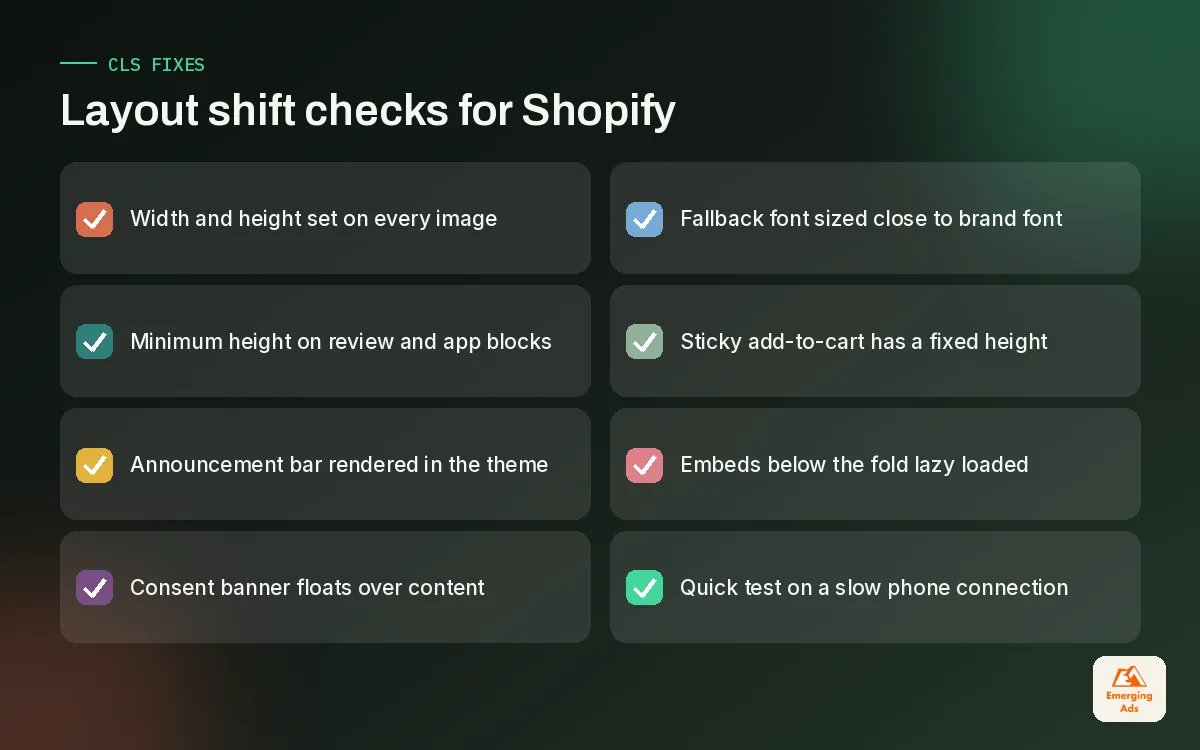
- Announcement bars and promo banners injected by apps after the page has rendered, pushing the whole page down by a strip.
- Review star ratings that load under the product title and push the price and buttons down.
- Images without dimensions in custom sections or rich text, so the browser cannot reserve the space.
- Font swaps where the fallback font and the brand font have different widths, so headlines rewrap.
- Cookie and consent banners that insert themselves into the layout instead of floating over it.
- Sticky add-to-cart bars that change height as they appear.
The fix pattern is the same every time: reserve the space before the content arrives. Give images width and height, give app blocks a minimum height, render the announcement bar in the theme rather than through an app, and make overlays float instead of pushing. Online Store 2.0 app blocks help here, because an app block sits in a known place in the section rather than being injected wherever the app decides.
07Shopify Core Web Vitals by template
Shopify stores are built from a small number of templates, so Core Web Vitals problems cluster. Knowing which template usually fails which metric lets you focus. This is the pattern we see most often across stores we manage, offered as a starting point rather than a rule.
| Template | Metric that fails most | Typical cause | Where we start |
|---|---|---|---|
| Homepage | LCP | Slideshow or video hero, lazy loaded first image | One sized still image above the fold |
| Collection | INP and CLS | Filter apps, quick view, review stars on cards | Lighter filters, reserved space on product cards |
| Product | LCP and INP | Gallery scripts, variant logic, stacked apps | Plain HTML first image, faster variant updates |
| Cart and drawer | INP | Upsell, shipping bar and tracking firing together | Visual update first, extras after |
| Blog and pages | CLS | Embeds and images without dimensions | Set dimensions, lazy load embeds below the fold |
The order matters commercially. Product and collection pages carry most of the revenue and most of the URLs, so fixing those templates moves both the Search Console groups and your sales. A faster homepage is nice, but on many of our accounts more paid traffic lands on product pages than on the homepage, especially when dedicated landing pages are not in use.
If you want to see how product page layout and performance work together, our guide to building a Shopify product page that sells goes through the elements that sit above the fold.
08Monitoring Shopify Core Web Vitals without obsessing
Because field data is a rolling window, a fix you ship today will not fully show for weeks. That delay is where most teams go wrong: they ship a change, see nothing move in three days, and undo it or pile on another change. We follow a simple rhythm instead.
| When | What we look at | What we do with it |
|---|---|---|
| Every release | Lab test on one URL per affected template | Catch regressions before shoppers do |
| Weekly | Shopify web performance report trend | Spot a jump and match it to a release or new app |
| Monthly | Search Console groups and PageSpeed field data | Confirm fixes are landing and groups are recovering |
| Quarterly | Vitals next to conversion rate by template | Decide whether more performance work is worth it |
We keep a simple change log with dates for every theme edit, app install and new pixel. When the web performance report shows a jump, the log usually names the cause within a minute. For larger stores we pull the field metrics into a Looker Studio dashboard beside revenue per visitor, which keeps the conversation about money rather than scores. Stores with complex tag setups benefit from advanced website tracking that is built with performance in mind from the start.
Pass the vitals for your shoppers, not for a screenshot. The score is the symptom, the shopper's patience is the thing you are protecting.
One more point on search. Core Web Vitals are part of how Google assesses page experience, but they will not rescue weak content or thin category pages. We treat them as a tiebreaker and a conversion lever, and pair them with proper ecommerce SEO for the bigger organic gains.
09Fixing it yourself vs bringing in help
Plenty of Core Web Vitals work is within reach of an in-house team: removing an app that does nothing, setting image dimensions, moving an announcement bar into the theme, stopping the first product image from lazy loading. If your failing metric is CLS, start there and you may solve it in an afternoon.
INP and stubborn LCP problems are harder, because they usually mean reworking theme JavaScript, app loading order and tracking together. That is where our Shopify speed optimisation service earns its fee, and why we often pair it with conversion rate optimisation so that faster pages also sell better. Our day-to-day store team keeps the gains from slipping back as new apps and campaigns arrive.
You can read more about how our Shopify team works on the teamemergingads.com homepage, see how the earlier pieces fit together in our Shopify analytics guide, or browse the full list of EmergingAds services to see where performance work connects to marketing and reporting.
Frequently asked questions
Straight answers to what clients ask us most about shopify core web vitals.
What are Core Web Vitals on Shopify?
What is a good LCP score for a Shopify store?
Why did my store start failing after INP replaced FID?
Why is my PageSpeed score low but Core Web Vitals pass?
How long does it take for Core Web Vitals fixes to show?
Which Shopify pages should I fix first?
Do Shopify apps affect Core Web Vitals?
What causes layout shift on a Shopify product page?
Do Core Web Vitals affect Shopify SEO rankings?
Why does Search Console show no data for some of my URLs?
Can a speed app fix my Shopify Core Web Vitals?
Want to know which Core Web Vital is holding your store back?
We will read your field data template by template, name the metric that is failing and the element causing it, and give you a fix list in order of impact.
Book your free audit