Shopify Apps: The Complete Guide to Choosing, Auditing and Trimming Your Stack
Most Shopify stores we inherit run twice the apps they need. This is how we decide which Shopify apps earn their place, which ones to replace with native features, and how to audit the lot without breaking anything.
Key takeaways
- Shopify apps should solve a problem you can name and measure. If nobody on the team can say what an app does for revenue, it is a candidate for removal.
- The right stack changes with store stage: a new store needs a handful of apps, an established brand needs fewer and better ones, not more.
- Every app that injects scripts carries a speed cost, and uninstalling it does not always remove the leftover theme code.
- Online Store 2.0 app blocks, Shopify Flow and built-in features now cover jobs that used to need a paid app, so check native options first.
- Run a full app audit twice a year and a light review every month, with a named owner for each app and a renewal date on the calendar.
01Why Shopify apps deserve more scrutiny than they get
Shopify apps are the reason the platform is so flexible, and they are also the most common reason a healthy store slowly turns sluggish, expensive and hard to change. When we take over a store, the app list is one of the first screens we open. On stores that have been live for three or more years, it is normal to find 25 to 40 apps installed, of which perhaps a dozen are doing anything useful.
None of this happens through bad intent. A founder installs a reviews app in month one, a pop-up app before the first sale, an upsell app after a webinar, a currency converter for a promotion abroad, and a countdown timer for one Black Friday. Each decision made sense on the day. Three years later nobody remembers why half of them are there, the monthly bill has crept up, and the theme is carrying code from apps that were removed long ago.
Our view after managing stores across fashion, beauty, supplements, home, jewellery, pet, food and electronics is simple: every app is a small permanent tenant in your store. It takes rent, it uses shared resources, and it can make noise for everyone else. Treat the decision to install one with the same care you would give to hiring a contractor, and you avoid most of the problems in this guide.
02The essential Shopify apps stack by store stage
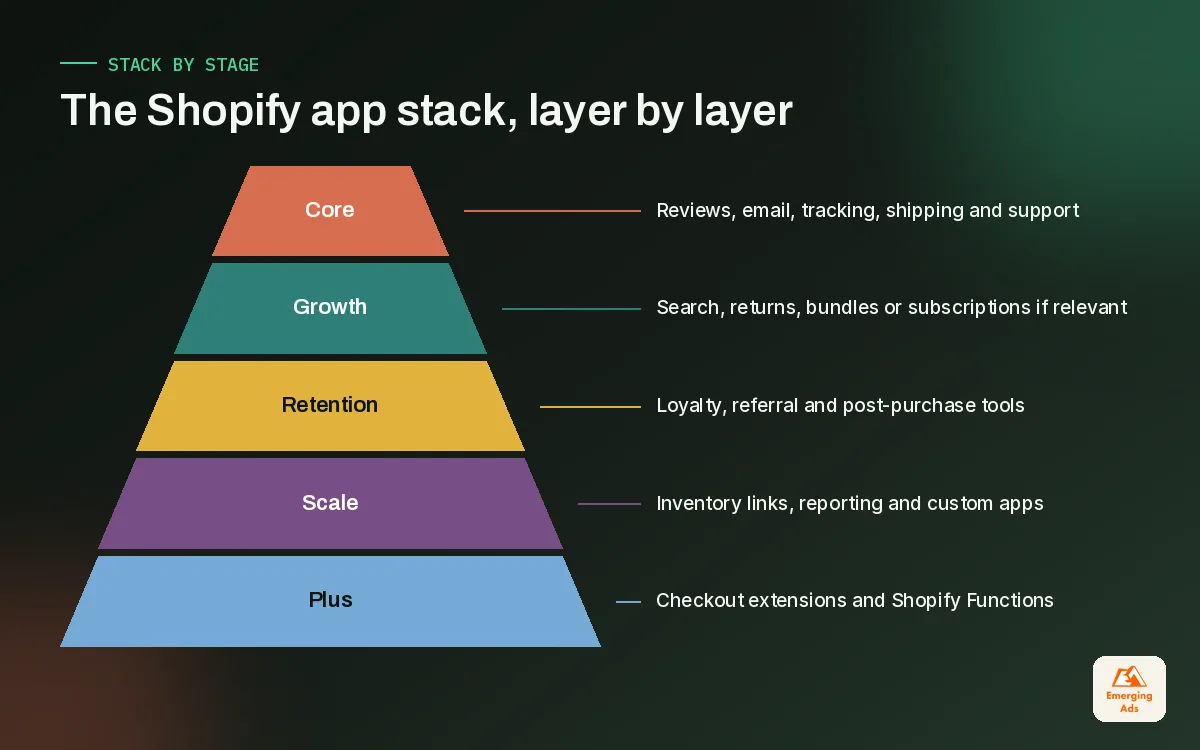
There is no universal list of the best Shopify apps, because the right answer depends on how much revenue the store does, how many products it carries and who runs it day to day. What we can offer is the shape of a sensible stack at each stage, built from what we see on live stores. Use it as a ceiling, not a shopping list.
| Store stage | Typical app count we aim for | What the stack covers | What to avoid |
|---|---|---|---|
| New store, pre-launch to first sales | 5 to 8 | Reviews, email capture and flows, tracking, shipping or fulfilment, basic SEO checks | Upsell bundles, loyalty, multiple pop-ups |
| Growing store, steady monthly orders | 8 to 14 | Adds subscriptions or bundles if relevant, returns, search and filtering, customer support | Overlapping tools that do the same job |
| Established brand, larger catalogue | 10 to 18 | Adds loyalty or referral, advanced merchandising, inventory and ERP links, reporting | Apps nobody owns or reviews |
| Shopify Plus or high volume | Varies | Custom apps, checkout UI extensions, Shopify Functions, deeper integrations | Legacy checkout scripts and unmaintained private apps |
These ranges are our working targets, not an industry benchmark. Some stores need more because of complex fulfilment or wholesale. The point is that app count should rise slowly and in step with clear needs.
The five jobs almost every store needs covered
- Reviews and social proof. Product reviews with photos, ideally with structured data the theme can output cleanly.
- Email and SMS. Capture, welcome series, abandoned cart and post-purchase flows. On most of our stores this is where Klaviyo email marketing sits, and it often pays for itself faster than any other app.
- Tracking. GA4 through the Google and YouTube app, and ad platform pixels through Shopify customer events, which is the supported route now. Our GA4 setup service starts exactly here.
- Shipping and fulfilment. Label printing, tracking pages and returns, depending on how orders leave the building.
- Customer support. A helpdesk or chat that links orders to conversations, so the team is not switching between five tabs.
Everything beyond these five jobs should come with a business case. Upsells, loyalty, quizzes, bundles and subscriptions can all be excellent, but only for the right catalogue and the right customer.
03How to choose Shopify apps without regret
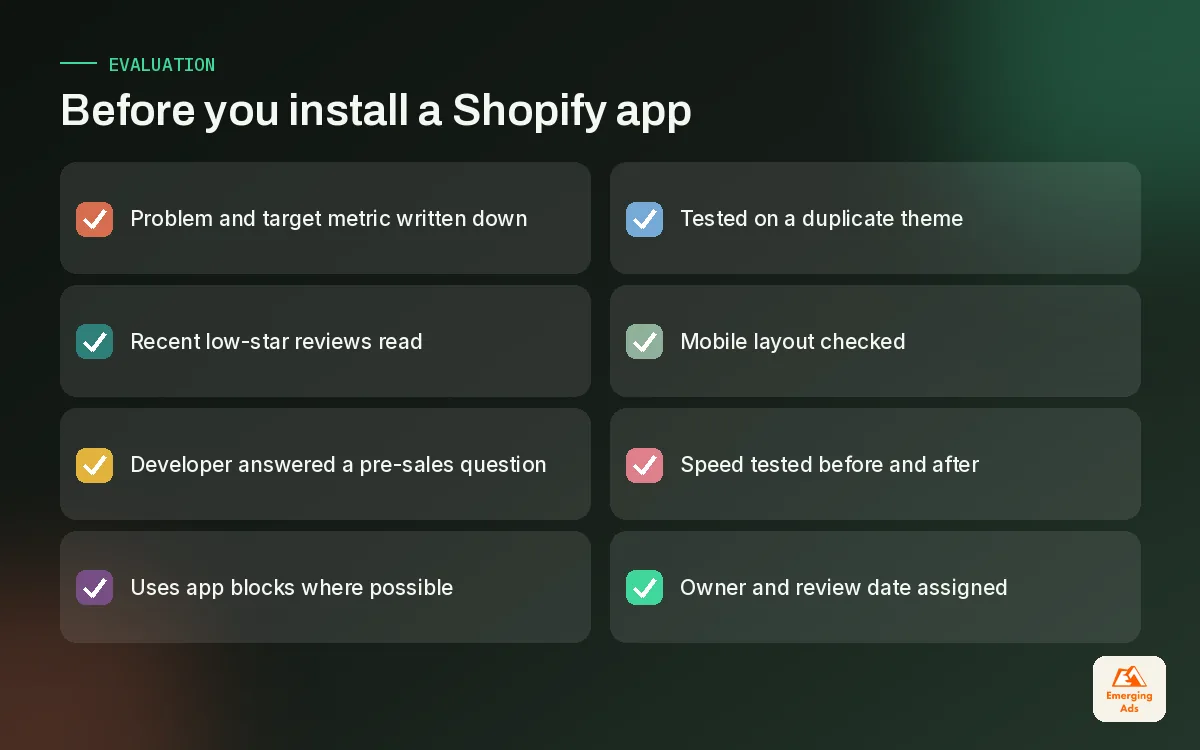
The Shopify App Store makes installing easy, which is exactly why choosing well needs a deliberate process. Here is the routine our team follows before a new app touches a client store.
Read reviews the way a buyer reads a contract
Star ratings tell you very little. Sort reviews by most recent and read the one, two and three star reviews from the last six months. You are looking for patterns: slow support, billing surprises, broken layouts after theme updates, or a recent change of ownership. A five star average built over years can hide a product that has been neglected since it was sold.
Test support before you need it
Send the developer a specific pre-sales question, ideally about how the app loads on your theme and what it leaves behind if removed. The quality and speed of the reply is the best predictor of the support you will get at 9pm before a sale.
Install on a duplicate theme first
Many apps now use Online Store 2.0 app blocks, which you add and remove in the theme editor without touching code. That is the cleanest option. Older apps may still edit theme files directly. Always preview on an unpublished copy of the theme, check mobile, and run a speed test before and after.
04The hidden cost creep of Shopify apps
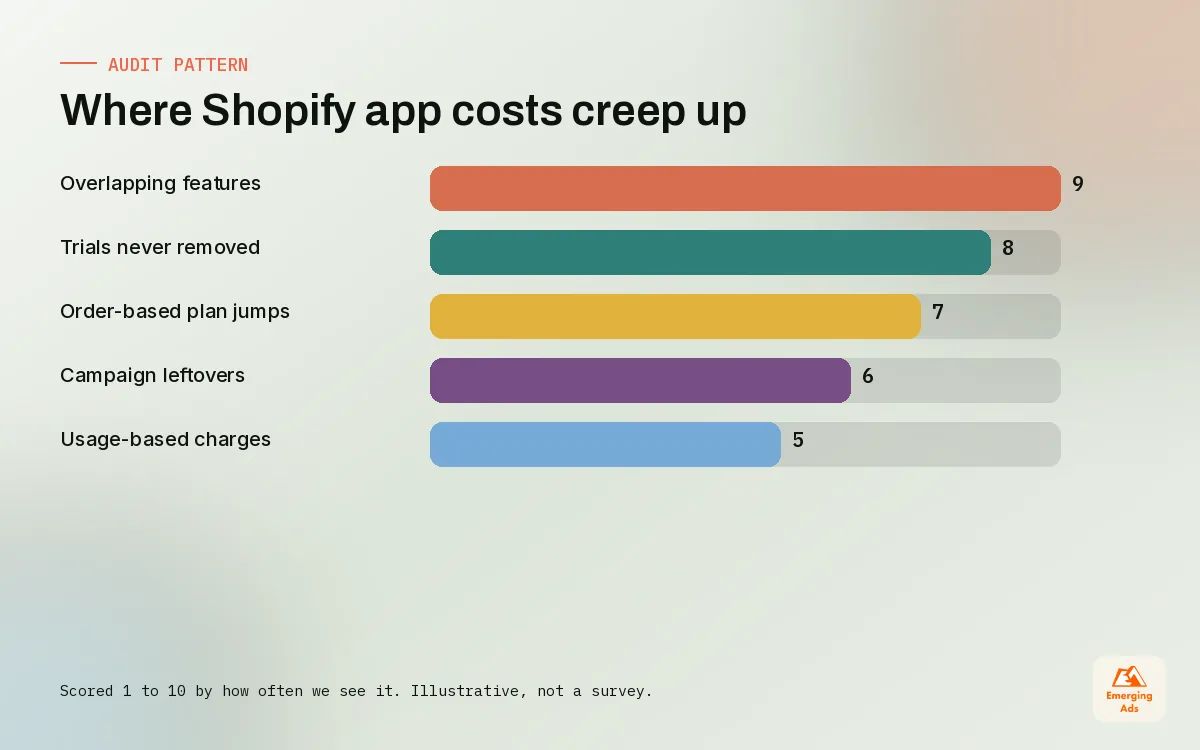
App costs rarely arrive as one large bill. They creep in through monthly plans that rise with order volume, usage-based charges, add-ons switched on during a busy month and then forgotten, and duplicate subscriptions for tools that do the same job. On stores we audit, the surprise is almost never one expensive app. It is twelve modest ones.
| Where the money leaks | What it looks like | How we catch it |
|---|---|---|
| Tiered pricing tied to orders | Plan jumps automatically after a strong month | Check billing history in the Shopify admin each month |
| Overlapping features | Two apps both offering pop-ups or upsells | Map every app to one job in a shared sheet |
| Trial apps never removed | Small monthly charges for tools nobody opens | Owner sign-off for every app at each review |
| Usage charges | Per-message or per-order fees that scale quietly | Set a monthly cap where the app allows it |
| Agency or freelancer installs | Apps added for one campaign and left behind | Rule that whoever installs it documents it |
Cost is also measured in time. Each app has its own settings, its own updates and its own support channel. When a store runs 30 apps, a surprising amount of the team’s week goes into keeping them working together rather than selling.
05How Shopify apps slow a store down
This is the cost that hurts sales directly. Every app that injects scripts onto the storefront adds work for the browser: more files to download, more JavaScript to run, more layout shifts while widgets load. One app is rarely a disaster. Eight apps all loading on the product page, each with its own tracking, fonts and styles, is how a fast theme ends up with a poor Largest Contentful Paint and sluggish interactions.
We covered the full speed process in our Shopify speed optimisation guide, so here we focus on the app side of it.
- Scripts on every page. Many apps load sitewide even when they only matter on one template. A size chart app has no business loading on the blog.
- Leftover code. Uninstalling an app does not always remove snippets, script tags or theme edits it made. We regularly find code from apps removed years earlier.
- Duplicate libraries. Two or three apps each loading their own copy of a similar library or icon set.
- Widgets that shift layout. Review stars, badges and banners that appear after the page renders, pushing content down and hurting Cumulative Layout Shift.
- Tracking stacked on tracking. Pixels added through apps, theme code and customer events at the same time, firing duplicate events.
Shopify’s admin includes a web performance report based on real visitor data, and PageSpeed Insights shows field data from the Chrome UX Report alongside lab data from Lighthouse. We use both before and after any app change so the decision is based on evidence, not a hunch. For stores where speed is already a problem, our Shopify speed optimisation work usually starts with the app list before touching images or theme code.
The fastest app is the one you did not install. The second fastest is the one that only loads where it is needed.
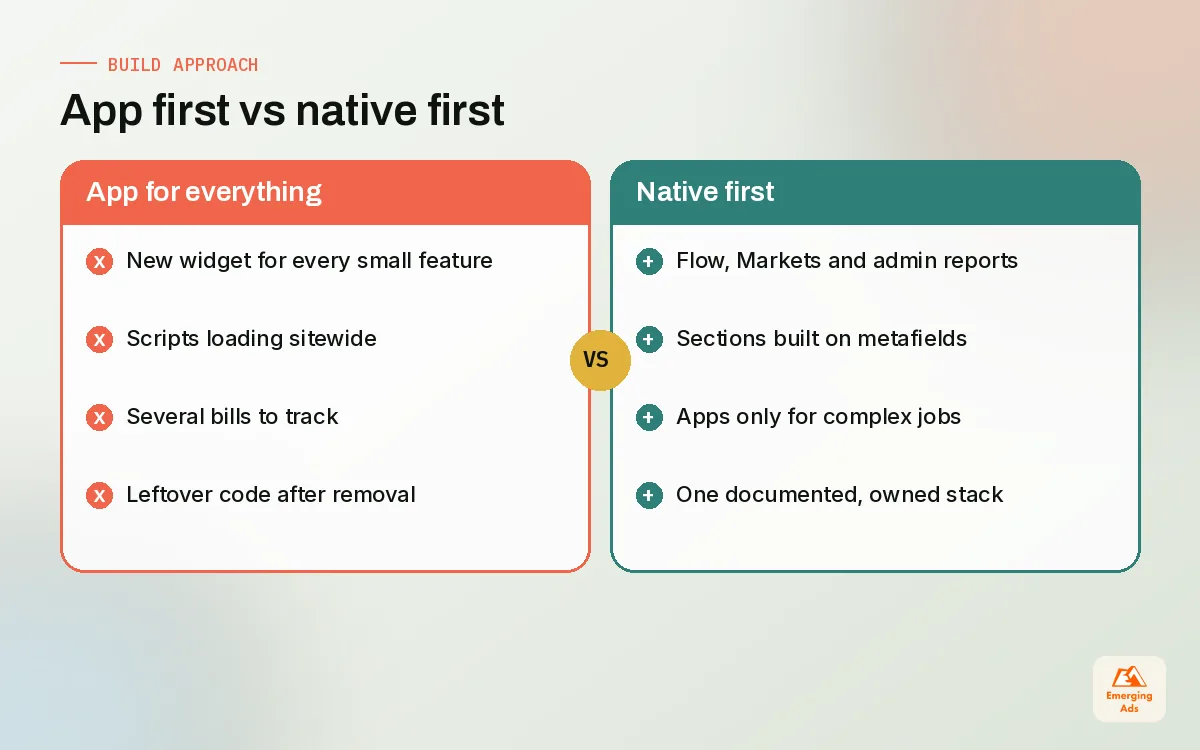
06Replacing apps with native Shopify features and theme code
Shopify has absorbed a lot of jobs that used to need third-party apps. Before paying for anything, we check whether the platform or the theme already does it well enough. Often it does.
| Job | Common app approach | Native or lighter alternative to check first |
|---|---|---|
| Simple automations (tagging, alerts, low stock) | Paid automation app | Shopify Flow |
| Selling in several currencies and languages | Currency converter widget | Shopify Markets |
| Basic reporting | Reporting app with dashboards | Shopify Analytics and Reports in the admin |
| Custom content blocks and layouts | Page builder app | Online Store 2.0 sections and blocks in a theme like Dawn |
| Product badges, size guides, FAQs | Several small widget apps | Metafields plus a theme section |
| Faster checkout | Checkout add-on apps | Shop Pay and Checkout Extensibility where your plan allows |
The swap is not always worth it. If an app does the job brilliantly and loads lightly, keep it. But custom theme work using metafields and sections often replaces three or four small widget apps with one clean block that loads only where needed. That kind of rebuild is part of how we approach Shopify conversion optimisation, because a lighter product page is usually a better converting one.
A note on checkout
Checkout customisation has moved to Checkout Extensibility, using checkout UI extensions and Shopify Functions, and checkout.liquid has been deprecated for the information, shipping and payment pages. If an app or old customisation still relies on the legacy approach, plan the migration rather than waiting for it to break.
07How to run a Shopify app audit
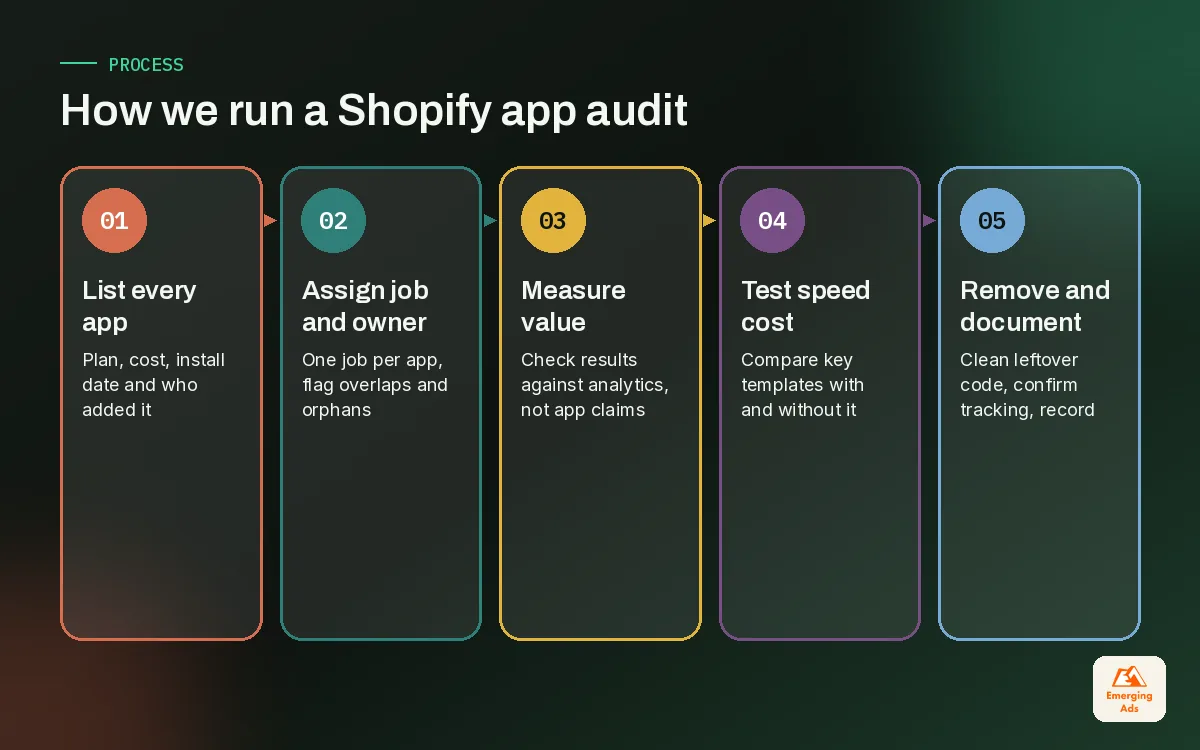
A proper Shopify app audit takes a day or two for a typical store and pays back for years. Here is the process we use, in order.
- Export the list. Every installed app, its plan, monthly cost, install date and who added it. Include custom and private apps.
- Assign one job and one owner to each app. If two apps share a job, flag both. If nobody will own an app, flag it.
- Check the data. Does the app show measurable results? Revenue attributed to upsells, reviews collected, tickets resolved. Be sceptical of each app’s own revenue claims and compare with your heatmap and behaviour analysis or analytics.
- Measure the speed cost. Test key templates with and without the app on a duplicate theme.
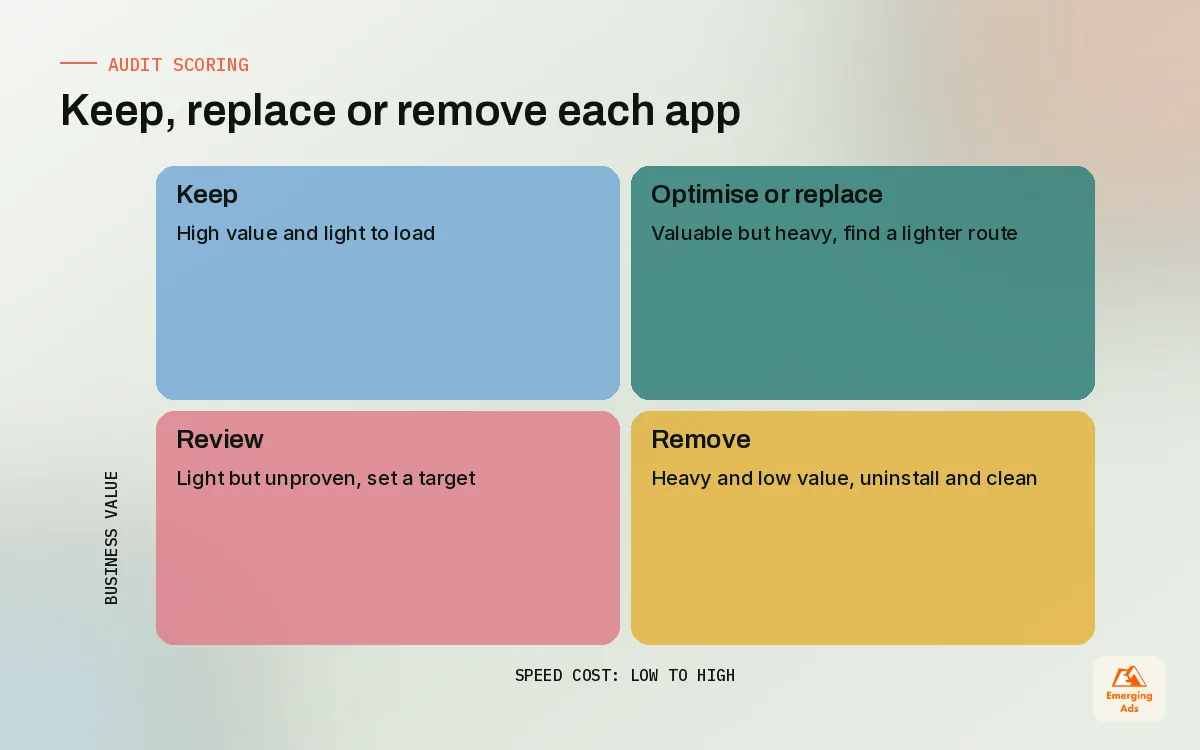
- Score each app: keep, replace or remove. Use the value and speed results together.
- Remove carefully. Uninstall, then search the theme for leftover snippets and script references, and confirm tracking still fires correctly.
- Document the new stack. One sheet, one row per app, with owner, job, cost and next review date.
Tracking deserves extra care during removal. Pixels belong in customer events now, and if an old app was firing ad platform events, removing it can create gaps. We always confirm events after changes, which is a big part of our Meta pixel tracking setup checks.
08What a lean app stack looks like in practice
A recent example: a skincare brand came to us with 31 apps and a product page that felt slow on mid-range phones. Over two weeks we removed 14 apps that were unused or duplicated, replaced four widget apps with one metafield-driven section, moved pixels into customer events, and cleaned out leftover code from apps removed in earlier years. Nothing customer-facing was lost. The team now reviews a single page of apps each month instead of guessing.
Another pattern we see often is a store with three separate email and pop-up tools layered on top of each other. Consolidating on one platform and rebuilding the email automation flows properly usually does more for revenue than any new app would.
If you are starting from scratch, the cleanest path is to get the stack right at launch. Our Shopify store setup service builds a minimal stack from day one, and our Shopify ecommerce marketing team then adds tools only when a campaign genuinely needs them. For stores already live, ongoing management keeps the list honest, as we described in our Shopify store management field guide.
You can see the full range of what we do across paid media, email and store work on our services overview, and more Shopify guides on the teamemergingads.com homepage.
Frequently asked questions
Straight answers to what clients ask us most about shopify apps.
How many Shopify apps should a store have?
What are the essential Shopify apps for a new store?
Do Shopify apps slow down my store?
Does uninstalling an app remove its code?
How do I judge Shopify app reviews?
How often should I audit my Shopify apps?
Can Shopify Flow replace paid automation apps?
Should tracking pixels be added through apps?
Are page builder apps worth it on Shopify?
What should I do with apps from a previous agency?
Is it better to use custom theme code than an app?
Is your app stack quietly costing you sales?
We will audit every app on your store for cost, speed and overlap, and give you a clear keep, replace or remove list you can act on this month.
Book your free audit